Shopping Guide
Table of Contents [+]
Class: All Classes
Faction: All Factions
Level: All Levels
Item Links:
Quicklink (copy this):
Feedback: Feedback-Thread
Once you have some credits in your pocket, you might want to go shopping, be it to upgrade your weapon, armor or just to get some ammo.Faction: All Factions
Level: All Levels
Item Links:
Quicklink (copy this):
Feedback: Feedback-Thread
Most items in shops have a quality level (QL), it is recommended that you look at requirements to use the item you're looking to buy. If you don't meet the requirements of the item, you won't be able to use it. For example, a QL 200 weapon will be impossible for a level 20 to use, therefore, it would be best to shop for something closer to your skills like a QL 20-30 weapon.
When you are looking for weapons or item which requires a certain skill, you should be aware that nanoformulas from different professions can affect your skills which will then allow you to equip something that otherwise you wouldn't be able to use.
It is fairly easy to shop, there are terminals all over the planet outside as well as a few types of shops.
NB : you can spot them on updated maps as Saavick's as they have specific icons shown on bottom of the map.
⇑
The Shop TerminalsSome shop terminals do not show externally what they stock and you won't know what they are selling until you use them. Some have different icons floating above, a cross means medical supplies, a figurine means clothes, a large gun means weapons and ammo, etc. You are likely to learn quickly what each icon represents.
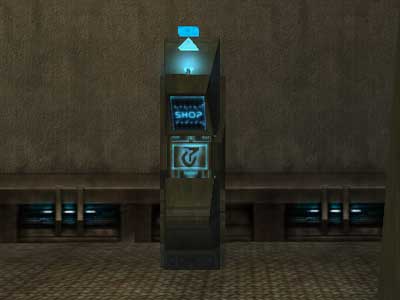
An Omni-Tek shop terminal.
Some terminals change stock, so you can't always expect the same items to be for sale. Although, if you know a terminal rotates stock, the approximate time for rotation is about 15-30 minutes. If the shop is empty, it takes 3 minutes.
⇑
NPC ShopsNPC shops provide items which rotate completely. This means that if the NPC sells weapons and ammo, when the stock rotates he is likely to have a different set of weapons (ammo usually doesn't change). The same happens with NPC's that sell medical supplies, implants, clothing, etc.
Not all shops look the same, but you will easily recognize what they sell when you are inside with the design of the shop or as we said previously with icons.
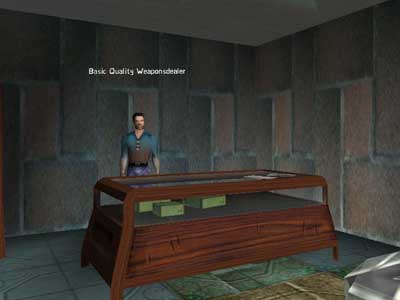
A neutral NPC vendor in his shop.
⇑
NPC VendorsNPC vendors are out in the open, within cities or outside in the wilds of Rubi-Ka, hoping you will stop by and purchase some of their stock to enable them to earn a living. These vendors usually offer more credits when you sell to them compared to terminals.
Almost every city/town has them which makes them quite easy to find. Out in the wild they can be in unusual and far locations including outposts which are rarely visited by players, so you may want to take note of where they are if you bump into an NPC selling items that you may want later on.
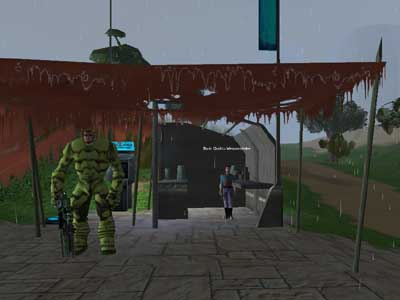
A vendor out in the wilderness.
The shopping cart icon is on the far right side.
NB : If you have Shadowlands extension, you can access special NPC vendors in each Garden or Sanctuary, and also buy stuff from Yuttos in their villages. All these are indicated on updated maps for each zone as on Bitnykk's SL map. But if you play even with just classical game, you still can access many NPC all around Rubi-Ka, for example among many others : Tsunayoshi Smith, Zoftig Blimp or Den Smuggler Broker, etc.
⇑
City/Town ShopsThese shops are the the life and blood of every city and town. They come in different categories:
-Fair Trade Shop - Stocks items between Quality 1-300.
-Luxury Supplies Shop - Has only 4 shopping terminals, one stocks vehicles.
-Finest Edition Shop - Has 4 shops terminals, including one which is for traders only.
~Basic Shop - Stocks items between Quality 1-40.
~Advanced Shop - Stocks items between Quality 40-75.
~Superior Shop - Stocks items between Quality 75-200.
- Note: The last three shops on this list can usually be found in Clan or Omni cities.
Only Clans can use Clan city shops, and only Omnis can use Omni shops.
*However, Neutral players can use every terminal in the Trade room of these shops, and random shops (use) in the main room, but nothing in the Nano room.
**Neutral players can also sell items to the Weapon terminals in any Omni shop (Basic, Advanced, Superior)
⇑
Shop LayoutBasic Shops, and Fair Trade shops have a 3 to 5-room layout. Generally a center room with individual vendor machines and entrances to 2-4 adjacent rooms.
- The Center room for armor, weapons, implants, medical supplies, containers, maps and miscellaneous items.
- A room that has pre-built-implants for beginners (for specific professions) with
- Implants from QL 10-125.
- Another room specializing in Tradeskill items,
- And a room to purchase each profession's Nanoformulas.
You can easily identify them because each entrance/door has a sign above it with "Trade Department", "Nano Department" or "Implants Department".
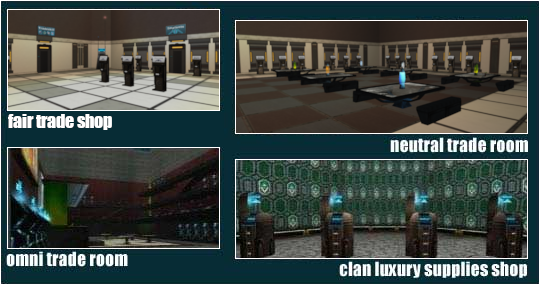
The Advanced and Superior Shops, older versions of shops, have a 4-room layout. They don't have a room near the exit with implants for beginners. These are often found in Athens, Tir, and Rome.
Luxury and Finest Edition carry furniture, ground/water/air vehicles and miscellaneous items.
⇑
Extension ShopsBeyond all upper types of shops mentioned, we'd have to add few more linked to specific extensions content.
Notum war : you can check for your local Tower Shops.
Alien Invasion: don't forget to visit Uncle Bazzit.
Shadowlands: look in Jobe for Specialists Booth.
Lost Eden: armors & nanos wait for you at Unicorn Defense Hub.
⇑
ICC ShopsAs you may know, we now access a Revamped ICC district with brand new buildings offering many shops all around its central monument.
They provide a wide quantity of content of higher QL than most other shops, including some elements you'd have to travel in Shadowlands or other distant places to obtain. Most are in "Shopping" building : within its corridor you get various categories available (tech supplies, accessories, armors, weapons, ammunitions, pharmacy, trader specialist booth, etc).
But, as you walk around outside ICC you also can find NPC shops:
Miir (mostly social clothing).
Armors
Pharmacy
Fair Trade - a bit of everything including pre-made low level Implants, Nanos, and a Tradeskill department.
Implants - With ALL quality levels of clusters including Jobe's refined high ones!
Phasefront Show Room - While Phasefront is no longer available for in-game purchase, this showroom demonstrates all it's vehicles: (Phantom, Ghost, Spectre, Wraith, Banshee, Phasefront Loungemaster - The Executive, Phasefront Kananmuna, and Phasefront: Westerlund Loungemaster.)
Note: You can currently only buy three of the above listed Phasefronts in the Item Store:
| Accurate as of May 30, 2025. | ||


Additionally, the other Phasefront vehicles are randomly available through the Daily Login Reward system found on the right side of your game UI, after you log on.
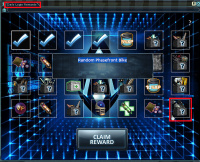
Daily Login Reward
Click image to increase the size
With all these great services now being concentrated in ICC, makes it a really unavoidable place for most of your shopping needs!
⇑
FactionMost shops are based on faction, this means that an Omni-Tek NPC/Shop/Terminal will not sell to a clan player, the same applies to any clan sided NPC/Shop/Terminal toward omni players. A neutral NPC/Shop/Terminal sells their stock to everyone.
NB : same goes for sided shopping channels offering a communication way by level ranges (11-50, 50-100, 100+), but to be fully honest about these, they are rather useless by now as GMI (explained below) is widely prefered.
⇑
The Global Market Interface (GMI)If you have the Alien Invasion expansion, you can also buy and sell from other players directly via the Global Market Interface (GMI). Without this expansion, you cannot buy or sell, but you can still use the terminals to look up items and their prices. The name of the seller or buyer is also shown, so you can contact them via a /tell instead.
⇑
Buying & SellingYour Computer Literacy (CL) affects the price for which you sell/buy items. The higher your skill the better price you will get either selling or buying. For every 40 points of skill, you receive a 1% discount on the item's base price when buying, or a bonus when selling.
Vendor Sell Price Hierarchy (Loot Payout)
To maximize your profit, always check the vendor type. The final price you receive is subject to a vendor-specific multiplier applied on top of your CL bonus.
The price structure is based on a Standard Terminal Price, which is the amount paid by most generic faction terminals (e.g., Clan shops in Old Athen/Tir, Neutral shops in ICC/Borealis).
Faction & Terminal Access
Generally, only characters of the matching faction (Clan, Omni, or Neutral) can access their respective advanced and superior shop terminals.
You can check a terminal's accessibility by Shift-clicking it to view its requirements (e.g., “Requirements: Use: On Self: omni” for Omni-only, or “Requirements: Use: On Self: Not clan” for Omni and Neutral).
Vendor Sell Price Hierarchy (Loot Payout)
The following price adjustments are applied on top of your CL bonus, relative to the Standard Terminal Price (STP).
| Vendor Category | Adjustment Over STP | Notes & Examples |
| Trader Specialist (Omni) | +100% | Highest reported payout. Omni Trader Shop. |
| Trader Specialist (Clan & Neutral) | +75% | Widely accessible Trader terminals (Clan & Neutral). |
| Omni-Tek Shops | +50% | Best for non-Traders. Found in general Omni-Tek shops. |
| Premium NPCs | +25% | Specific NPCs (e.g., Des Morck in ICC, Arul Saba in Jobe Market). |
| Standard Vendors | 0% (STP Baseline) | Most generic Clan and Neutral terminals. |
| Bargain/Anomalous | -25% Reduction | AVOID THESE. NPCs like Rita Deluth, Candi Rose, and older terminals. |
| This hierarchy is subject to change with game updates. | ||
Purchasing Costs
Be warned: Vendor buy prices are subject to the same CL discount rule, but certain shops charge drastically different base prices for items, especially implants and clusters.
Neutral Fair Trade shops consistently charge the most for items. For high-quality items, prices can be severely inflated compared to sided shops:
- Items between QL 100 and 200 from Advanced Terminals can be 5 times more expensive.
Items in the QL 200-300 range from Superior Terminals can be 10 times more expensive.
If you are on a budget, prioritize purchasing items from a sided shop that matches your faction for better rates.
Last updated on 09.23.2026 by Cariadast
Current Phasefronts available in Itemshop researched by Cariadast
Additional Phasefront Daily Login Rewards info and research added by Cariadast
ICC info and additional researched items added by Bitnykk
Information originally provided by Windguaerd.
Updated by Ukblizzard.
Do you have questions about this article or found an error? 5 comment(s) - Click here to view them!
Current Phasefronts available in Itemshop researched by Cariadast
Additional Phasefront Daily Login Rewards info and research added by Cariadast
ICC info and additional researched items added by Bitnykk
Information originally provided by Windguaerd.
Updated by Ukblizzard.
Do you have questions about this article or found an error? 5 comment(s) - Click here to view them!
