Pet Name Color
Table of Contents [+]
Class: All Classes
Faction: All Factions
Level: All Levels
Item Links:
Quicklink (copy this):
Feedback: Please Login first
Looking for a way to bring some color in your pets life?Faction: All Factions
Level: All Levels
Item Links:
Quicklink (copy this):
Feedback: Please Login first
You can name your pet with the following command:
/pet rename NAME
But did you know there's special code you can supply, to change the color of the name as well?
⇑
Basic color namesUnfortunately we can't display the code for the colors directly in this guide, as it doesn't render on the website. However you can download a textfile which contains an example line with a color each.
Open the file with your favorite text editor and copy the line of color you'd like for your pet's name.
Download the example lines with each color here:
petnames.txt
Copy the line of color code you'd like to see your pet name in, including the weird symbols.
Then change the text after the symbols to whatever name you'd like to give your pet.
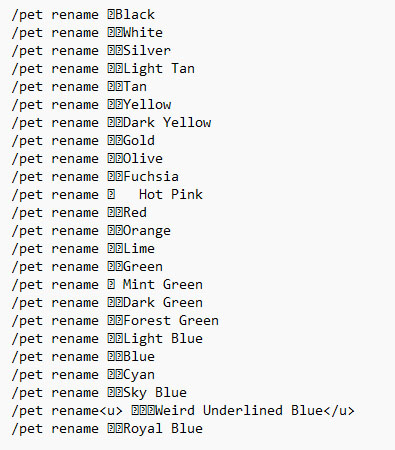
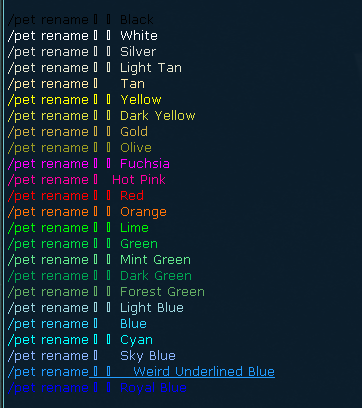
See this reference image for the correlating colors and how it'll look in the game:
⇑
Combine multiple colors in a nameYou can also make the name multi-colored.
To do this you have to put the name of your pet in quotes:
/pet rename "NAME"
Inside the quote you can use multiple of color codes after another. Each time you add a color code, the letters following will be in that colors.

Last updated on 03.05.2026 by Khuri
Script credit: Twinkable & Deep
Do you have questions about this article or found an error? No comments yet - Please login first to post a comment.
Script credit: Twinkable & Deep
Do you have questions about this article or found an error? No comments yet - Please login first to post a comment.
